
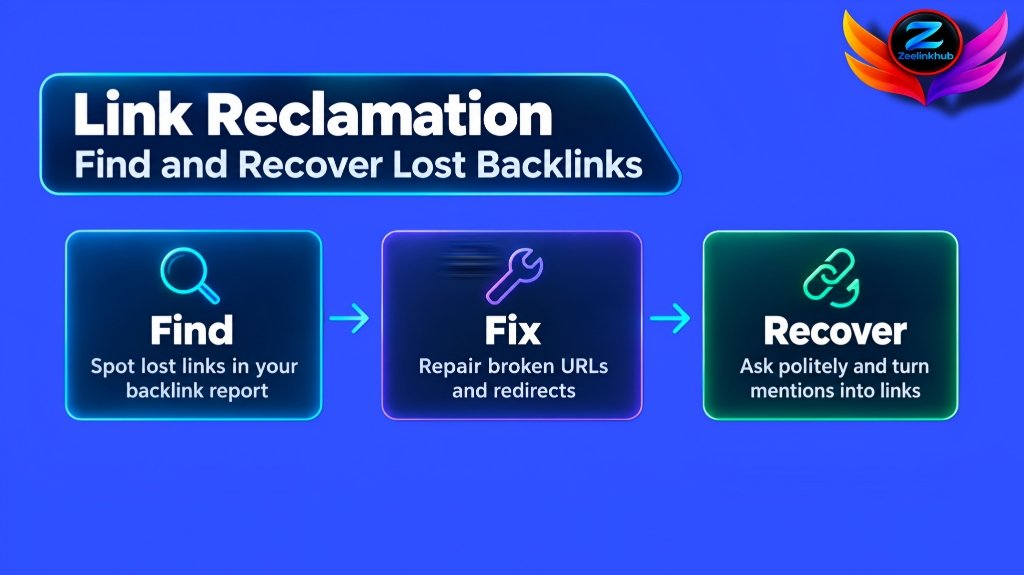
A website can earn a good backlink today and lose it a few months later. The page linking to you might get updated, your URL might change, or the website owner might remove the link without realizing it.
When that happens, you don’t always need to start looking for a new backlink. Sometimes, you can recover the one you already earned.
That’s where link reclamation comes in. It’s a practical part of link building that helps you find lost links, fix broken URLs, and turn unlinked brand mentions into potential backlink opportunities. For websites that have spent time earning links, it’s worth checking what has been lost before investing more time and money in new placements.
What Is Link Reclamation?
Link reclamation is the process of identifying and recovering backlinks or link opportunities that once pointed to your website but no longer provide a working link.
For example, a marketing blog might have linked to one of your articles last year. After updating its content, the editor removes your link. You still have the relationship and the original mention, but the backlink is gone.
You can contact the website owner, explain what happened, and ask whether they would consider restoring the link.
Link reclamation can also include fixing backlinks that point to broken pages, recovering links lost after a website migration, and contacting publishers who mention your brand without linking to it.
The goal isn’t to ask every website for a link. It’s to find opportunities where restoring or adding a link makes sense for the reader.
Why Do Websites Lose Backlinks?
Backlinks disappear for several reasons. Understanding what happened makes it easier to decide whether a link is worth recovering.
1. A website removes or updates a link
Publishers regularly refresh old articles. During an update, an editor might remove an outdated reference, replace a resource, or accidentally delete a link that still works.
If the article remains relevant to your page, a polite request may be enough to get the link restored.
2. Your page returns a 404 error
A 404 error means the requested page can’t be found. This often happens when someone changes a URL, deletes an article, or reorganizes a website without setting up redirects.
Imagine a finance blog links to your guide about budgeting tools. Later, you change the URL, and the old address returns a 404 error. The referring website may still have the backlink, but visitors can no longer reach your guide through it.
If the original page has moved permanently, a relevant redirect may solve the problem. If the content still exists at the old URL, restoring the page may be the better option.
3. Your website changes domains or URLs
Website migrations can create backlink problems when old URLs are not redirected correctly.
For instance, you might move an article from /blog/seo-guide/ to /seo-guide/. Websites linking to the old address may continue sending visitors there.
A properly configured 301 redirect can help visitors and search engines reach the new URL. You should also update important internal links and contact high-value referring websites when a direct link update is worthwhile.
4. A publisher mentions your brand without linking to it
Sometimes, an article mentions your company, product, or website but doesn’t include a clickable link.
These are called unlinked brand mentions. They aren’t lost backlinks because a link never existed, but they can provide useful reclamation opportunities.
If the mention refers to your original research, a useful resource, or your product, you can ask the author to add a link so readers can find the source.
Not every mention needs a backlink. Focus on cases where linking to your website genuinely helps the reader.
5. The link changed, but it didn’t disappear
This is the most common reason a link shows up as “lost” when it isn’t really gone. A publisher may have changed your link from a normal link to nofollow, sponsored or ugc. The link is still on the page and still sends visitors, but some tools may report it differently.
A link can also look lost when the referring page has moved to a new URL, or when the tool simply crawled the page at a bad moment. That is why a manual check matters before you send a single email.

How to Find Lost Backlinks
You don’t have to inspect every page on the internet manually. A backlink analysis tool can help you identify lost links and investigate what happened.
Step 1: Check your lost backlinks report
Open a backlink analysis tool such as Ahrefs and enter your domain. In Ahrefs, this is usually in Site Explorer, where the backlinks report lets you switch to lost links. Other tools have a similar report, though the names and menus can change over time, so look for anything labeled “lost” or “removed.”
Review the results and pay attention to:
- The website that originally linked to you.
- The exact page on that website containing the link.
- The URL on your website that received the backlink.
- When the link was first detected as lost.
- Whether the referring page or your destination page is still accessible.
Export the results if you have a large number of links to review. A spreadsheet makes it easier to track your findings and follow-up messages.
Step 2: Check whether the link is actually gone
Don’t assume every link marked as lost needs to be recovered.
Open the referring page and look for your link. Sometimes, a tool reports a change that doesn’t tell the whole story. The link might have moved to another section, the page might have changed, or the backlink might still be present. It may also have been changed to nofollow, as explained above.
Next, open the destination URL on your website.
If the destination page returns a 404 error, investigate whether the content has moved or been removed. If the referring page no longer exists, recovering the original backlink may not be possible.
This manual check helps you avoid contacting publishers about links that are still working.
Step 3: Evaluate the backlink
Not every lost backlink deserves the same amount of attention.
Start with links from relevant websites, useful articles, and pages that can send qualified visitors. A link from a respected finance publication to your personal finance guide may be more valuable to pursue than a link from an unrelated website with little connection to your audience.
Look at the context, the referring page, and whether the link would help readers. Don’t judge a backlink by a single authority score.
If the link came from a low-quality or unrelated page, you may be better off spending your time elsewhere.
Step 4: Contact the website owner
Once you’ve confirmed that a valuable link is missing, find the editor’s or website owner’s contact information.
Keep your message short. Mention the article, explain what you noticed, and provide the correct URL if the page has moved.
Avoid demanding that the publisher restore the link. The goal is to make it easy for them to understand the issue and decide whether an update makes sense.

How to Recover Broken Backlinks With 404 Errors
Broken destination URLs deserve special attention because you may be able to fix the problem without asking the referring website to edit its article.
First, determine whether the missing page has a replacement.
If the content has moved to a new URL, set up a 301 redirect from the old URL to the most relevant replacement. Test the redirect to make sure it leads to the correct page and doesn’t create a redirect chain, where one redirect leads to another before reaching the final page.
If the original article was deleted but still deserves to exist, consider restoring it. This can be a sensible option when the page has useful content and backlinks from relevant websites.
However, don’t redirect every broken URL to your homepage. A redirect should lead visitors to a page that matches what they expected to find. When the destination has little to do with the old page, search engines may treat the redirect as a soft 404, which means the link value may not pass on the way you hoped. Sending visitors somewhere unrelated also creates a poor experience.
If there is no suitable replacement, you may need to leave the page unavailable and consider contacting the referring website with a more relevant resource.
For a website with hundreds of broken URLs, a crawl and backlink audit can help you prioritize the pages that deserve attention first.
How to Turn Unlinked Brand Mentions Into Backlinks
Unlinked brand mentions are another opportunity worth reviewing.
Start by searching for your brand name, product name, or distinctive company name. You can use a web search or a mention-monitoring tool to find pages that discuss your business. Free options like Google Alerts can notify you when new pages mention your brand, and paid tools such as Ahrefs Alerts do something similar with more control.
Open each result and check whether the publisher has already linked to your website. Then consider whether adding a link would improve the article.
For example, a SaaS review site might mention your software while discussing tools for small businesses. If the mention refers to your product, asking the editor to link to your official product page could help readers find more information.
When you make the request, keep the link simple. A brand mention usually works best with your brand name as the clickable text, which also keeps your profile looking natural. If you want to understand why that matters, our guide to anchor text distribution explains how to keep links balanced.
A simple outreach email might look like this:
Subject: Quick question about your article
Hi [Name],
I came across your article about [topic] and noticed the mention of [Brand Name]. Thanks for including us.
Would you consider linking that mention to our website at [URL]? It may help readers find the relevant information more easily.
Thanks for your time.
Best,
[Your Name]
Personalize the message before sending it. If the mention doesn’t provide a good reason for a link, don’t force the request.

Link Reclamation vs. Link Building
Link reclamation and traditional link building share the same broad goal of earning useful backlinks, but the approach is different.
With link reclamation, you’re working with an existing connection: a lost backlink, a broken destination, or an unlinked brand mention.
With traditional link building, you’re usually creating a new opportunity. That might involve publishing a guest post, pitching an original resource, or contacting a relevant publisher about contributing useful content.
For example, restoring a lost link from an industry blog may take one email. Earning a new guest post placement may require research, outreach, content creation, and editorial approval.
Both approaches can be useful. Reclamation is often a sensible place to start because it lets you review opportunities connected to work you’ve already done.
There is one limit to keep in mind. Reclamation only works if you already have links, mentions or old URLs to work with. A brand-new website has very little to reclaim, so it will usually need to build its first links through new placements. If you’re deciding between approaches, our guide to guest posts vs. link insertions explains how the two differ and when each may fit your goals.
Once your lost links are sorted, the next question is where else you could earn links. A link gap analysis shows which sites link to your competitors but not to you, and it is a good follow-up step after a reclamation review.
How Often Should You Check for Lost Links?
The right schedule depends on the size of your website and how actively you’re building links.
For a small business website, a monthly or quarterly review may be enough to catch important changes. Larger websites with frequent publishing or active link-building campaigns may benefit from more regular checks.
Some events call for an immediate check, regardless of your normal schedule. After a website migration, a redesign, a change of domain, or a large URL cleanup, review your backlinks and redirects within days, not weeks. This is when most broken backlinks appear.
During each review, focus on:
- Recently lost backlinks from relevant websites.
- Broken destination URLs that have valuable referring links.
- Unlinked brand mentions with a clear reason to link.
- Redirect problems following website updates.
- Links that have been restored and need verification.
Keep a simple record of each opportunity, including its source URL, target URL, issue, contact details, outreach date, and current status.
This makes it easier to see which issues have been resolved and which ones still need attention.
Common Link Reclamation Mistakes to Avoid
A few mistakes can waste time or damage relationships with publishers.
Contacting publishers before checking the link: Verify that the backlink is actually missing before sending an email.
Chasing every lost link: Prioritize relevance, editorial context, and potential value to readers instead of trying to recover every backlink. If you’re unsure how much link building a page really needs, our guide on how many backlinks you need to rank can help you judge what is worth the effort.
Redirecting unrelated URLs: A redirect should lead to a suitable destination, not simply the homepage.
Sending generic outreach: Mention the specific article and explain why restoring the link would be useful.
Expecting every request to succeed: Publishers may have removed a link intentionally, changed their editorial policy, or no longer maintain the page. Respect their decision and move on.
Link reclamation works best as a steady maintenance task, not as a campaign to force every old link back into place.
Final Thoughts
Link reclamation gives you a practical way to find backlink opportunities that may otherwise go unnoticed. By checking lost links, fixing broken destination URLs, and reaching out about relevant unlinked brand mentions, you can make better use of your existing link profile.
Start with a backlink report, verify each issue manually, and prioritize links that make sense for your website and audience. Fix technical problems where possible, and keep your outreach short and respectful.
You don’t need to recover every link to make the process worthwhile. Focus on the opportunities that offer a genuine benefit to readers.
If you’re looking to build relevant backlinks through guest posting or editorial link placements, explore our guest posting and link placement services or contact our team to discuss your website and link-building goals.

Leave a Reply